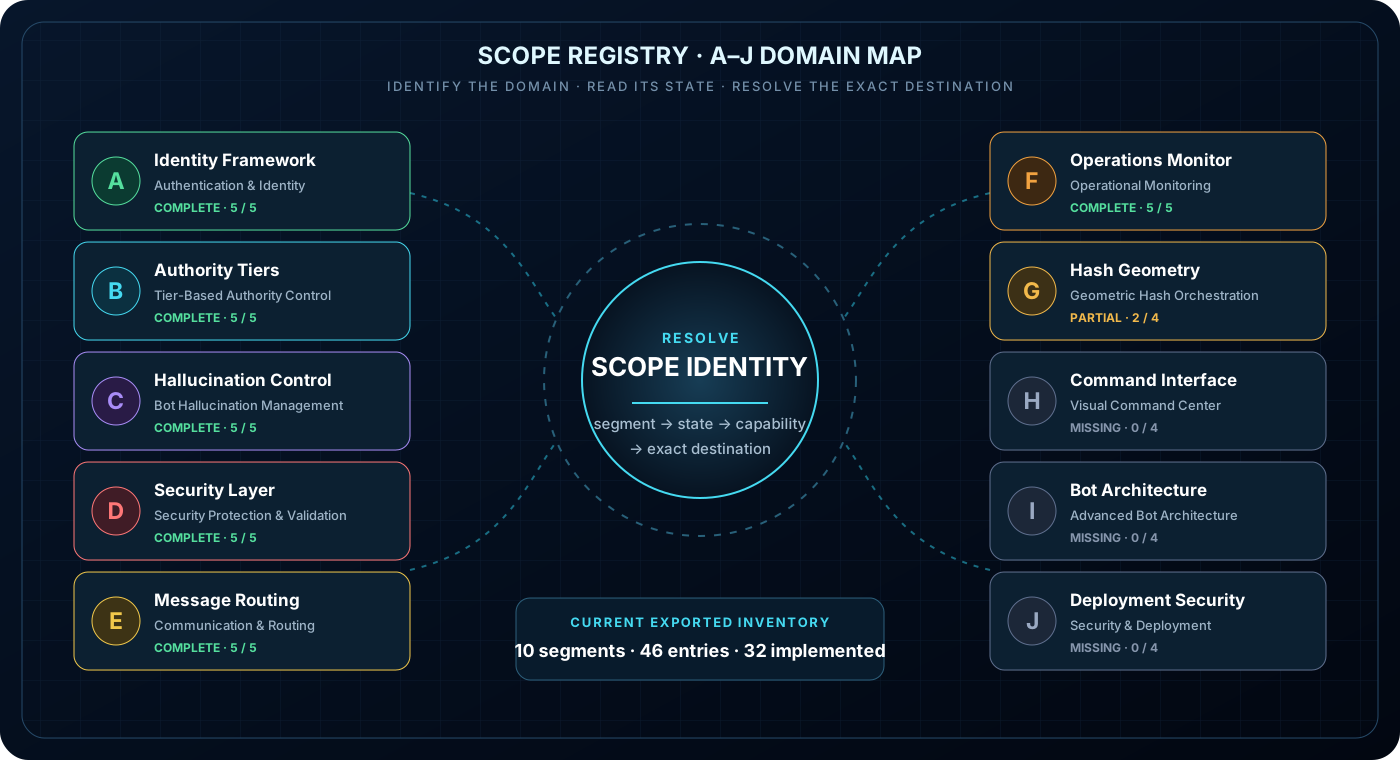
The Scope Registry divides the governance architecture into ten named functional segments, A through J. It makes the topic’s domain, current classification, capability identity, and intended destination explicit before anyone follows a link.
10FUNCTIONAL SEGMENTS
A–JSTABLE DOMAIN LABELS
▣
Public learning boundary. This static page explains the exported A–J segment model. It does not query the live registry, expose private scopes or tenant data, alter classification, grant authority, or prove that a planned capability has been implemented.
The status counts reflect the current exported segment data used by AIAGF. The registry organizes scope; it does not authorize access.
1. Locate the A–J segment
Choose a segment to inspect its domain purpose, current exported state, and a representative capability. The stable letter keeps the scope recognizable even when the display label is shortened.
A
Authentication & Identity
Presence-gated identity, multi-tier hash identity checks, and dual-key governance.
Scope boundaryIdentity answers who is requesting; it does not substitute for runtime state.
2. Read classification before following capability
A topic link should resolve through its scope—not dump every reader onto one generic Operations page.
01 →
Identify the topic
Start with the reader’s named subject, not a product homepage.
02 →
Resolve the segment
Attach the topic to its A–J functional domain and stable identity.
03 →
Respect classification
Public, consumer, operator, and internal are disclosure boundaries—not decorations.
04 ✓
Open the exact destination
Consumer goes to the matched AIAGF walkthrough; Operator goes to the matched OQS overview or live surface.
Classification is not authorization. A scope label determines how the capability should be described and routed. It does not grant credentials, bypass sign-in, or turn a planned item into an implemented one.
Continue the matched topic
Walk Scope Registry, or open the live Operations Home
The AIAGF walkthrough guides consumers through the A–J segment, scope classification, and capability connection. Signed-in operators can continue into OQS Operations Home.