Synthetic task detail
Reconcile an evidence package
Extracted terms support search and alignment review; they are evidence about the request, not proof that execution succeeded.
reconciliationevidence-chainscope:governanceexpected-outcome
Task Operations lets an operator see where work came from, what state it is in, how urgently it should be routed, and which evidence belongs to it—without confusing submission with execution.
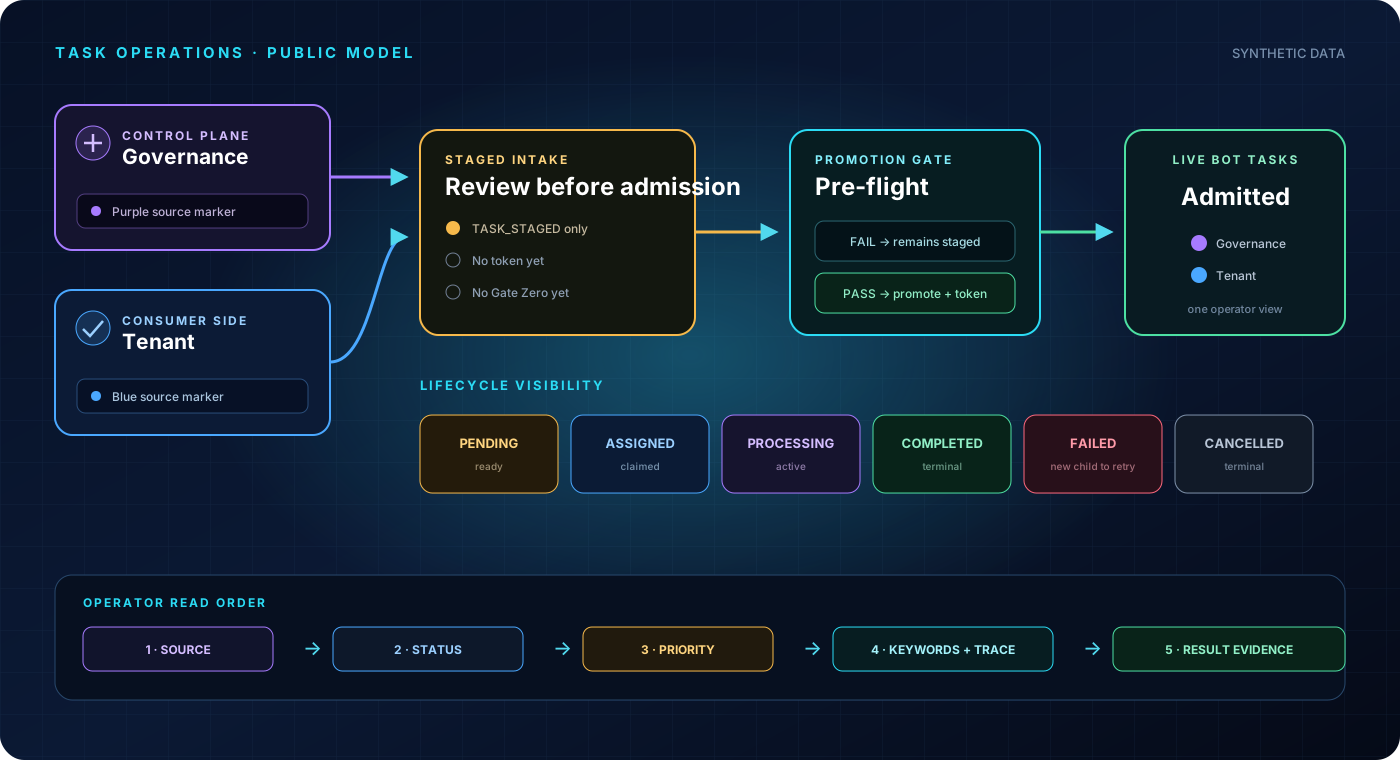
The operator view merges records for visibility; it does not merge the databases or their endpoints. Select a source or gate to inspect its responsibility.
Governance work lives on the Control Plane side and is visibly marked purple in Live bot tasks.
A status is a declared operational state. It tells the operator what happened and what kind of attention, if any, is appropriate.
The scale runs from 1 (most urgent) to 10 (background). Lower numbers are considered first; priority does not bypass staging, authority, or governance checks.
The row is only an index. The detail surface is where routing, extracted keywords, lineage, and gate results become inspectable.
Extracted terms support search and alignment review; they are evidence about the request, not proof that execution succeeded.
Start with provenance, then current state. Use the task handle to correlate the detail, activity, Flight Recorder events, and any parent/child relationship.
The AIAGF walkthrough demonstrates the Workbench, conduct modes, held handoffs, governed decisions, trace evidence, and NTF handoff preparation. The live OQS queue remains operator-gated.